Every matter makes your firm smarter.
Your firm gets more experienced without getting bigger. Every workflow step, correction and approval becomes institutional memory: scoped per client, permissioned and provable. Every matter improves the next, and the walls between clients stay intact.
Keep working the way you do. manykind runs underneath.
Law firms don't get smarter over time. They just get busier.
The firm's best thinking is trapped in PDFs, inboxes and people's heads, and it disappears when the matter closes or the associate moves on. Every new matter starts close to zero. If you are not keeping what each matter teaches you, you are throwing it away every day.
No single record, and no proof it is complete.
One record per matter, in the client's own vault.
- Knowledge leaves with people. The reasoning behind a position is in someone's memory, not the file.
- Precedent sits in PDFs that nobody can find when the next matter needs it.
- AI tools help you think, but they don't help the firm remember.
Your firm never moved to the cloud. That was right.
The big-data era was never about custody. It optimised for collection: what a platform could gather, keep and learn from. Firms that kept client files out of it were right. To move into the agentic era, law firms need data sovereignty and data agility settled at the foundation, not bolted on. That is where manykind starts. Underneath the workspace sits a content-addressed store the firm administers: files kept exactly as written, every version on the record, and access at every level granted by signature and revocable the same way. Only then do the agents come in.
One vault per client. One record per matter.
Memory, workflow and models in one system. Every step is recorded, attributed and traceable, built into the system rather than bolted on.
Ask once. Get the client's whole history.
Every past conversation, email, meeting note and file for a client sits in that client's sovereign vault, with its original dates. One request pulls it together. Matters end; clients do not, so the vault keeps what it learns about each client: its structure, its positions, its obligations and its preferences. Lawyers, paralegals, the client and agents each see only what they have been granted, per client and per person.
What was the key objection in the last redline?
Clause 9, the liability cap. Orchard Labs asked for 12 months of fees instead of 6.
From the 12 Oct email, the 12 Oct call notes and the v3 to v4 redlineOne agreement, everyone working on it.
A matter starts from your firm's own master templates and the sources you pin to it. Lawyers, the client and drafting agents work on the same versioned agreement. A save made against an outdated version is refused, so nobody silently overwrites anyone.
- Clean, redline and side-by-side comparison of any two saved versions.
- Clean and redline Word export of the version you select.
- Internal approval is bound to one exact version.
- Open. The matter team opens a session on the client's vault and states the question.
- Work. Agents research, draft and challenge. Lawyers steer and decide, in the same thread.
- Land. The draft lands in the client vault with its full trail.
Every matter makes your master templates better. A background workflow reviews the redlines across matters and proposes template updates for a partner to accept. The improvements live in the firm's memory bank; client text stays in each client's vault.
Who took part, with which tool, producing what.
Set up your team once: which lawyers work on which clients. Every matter then runs as one recorded workflow, from first brainstorm to final record. Each step shows the people who took part, the tool they used and what it produced.
Paralegals, lawyers and managing partners each see their own scope. Managing partners also get an overview across matters: where work is waiting and how each workflow performs.
Kept apart, by design.
The client vault
What belongs to the client: matters, emails, call notes, drafts, redlines, positions and obligations. Only the people and agents the client's scope allows can read it.
The firm's memory bank
What belongs to the firm: who worked on which matter, how each workflow performed, and what the firm learned about drafting. Template improvements come from patterns across matters, and a partner approves every change. Client text never moves into another client's vault.
Proof, not promises.
- The workflow history of every matter: each step, in order, with its original date.
- The permissions in force at each step: who could see what, and under which grant.
- What was reused from earlier work, and where it came from.
- Who approved what, and which exact version they approved.
Go deeper.
How the Agent OS runs a firm's work: the platform, the scopes inside a client vault, the agents that keep working on each client, and the kinds of agent a matter can use.
Your firm
People with authorised roles
- Client
- Counsel
- Contractor
- Board and executives
An agent catalog the firm owns
- Your own agents
- Approved third-party agents
AccessSkillsTools
The Agent OS
- Autonomous and on demand
- Permission checked on every run
TraceableAuditableVerifiable
The client's own data
- Data and local models stay here
- Knowledge compounds within scope
Client vault One per client. Matters and practice areas are scopes inside it.
- CommercialScope with its own event log
- PrivacyScope with its own event log
- ProductScope with its own event log
- CorporateScope with its own event log
- EmploymentScope with its own event log
- LitigationScope with its own event log
- RegulatoryScope with its own event log
- AI governanceScope with its own event log
- IPScope with its own event log
Every scope keeps attributed writes and lineage.
Agents
Scopes bound agent access today. Firm-side roles and ethical walls are specified with your team.
Matters end; clients do not. One client vault that every matter, scope and agent writes back into.
Client vault
- Structure
- Positions
- Obligations
- Preferences
What the vault knows about this client
Operators run in constant loops, autonomously or when a lawyer asks.
- Research operatorPrecedent and authorityStatutes, cases, memos
- Drafting operatorDocuments and redlinesDrafts, redlines, clause library
- Deadline operatorObligations as living stateFilings, renewals, limitation dates
Three kinds of agent
- Resident agents
- Run inside the client's vault. They route work, make judgement calls and write back to the client vault.
- Model agents
- Local models, or ChatGPT and Claude called under a grant. They see only the brief they are handed, and their output returns to the vault.
- External tools
- Research databases, e-discovery and filing systems, connected with explicit rules on what may go out.
What your team works in.
Screens from the demo workspace. The clients, people and agreements shown are fictional.
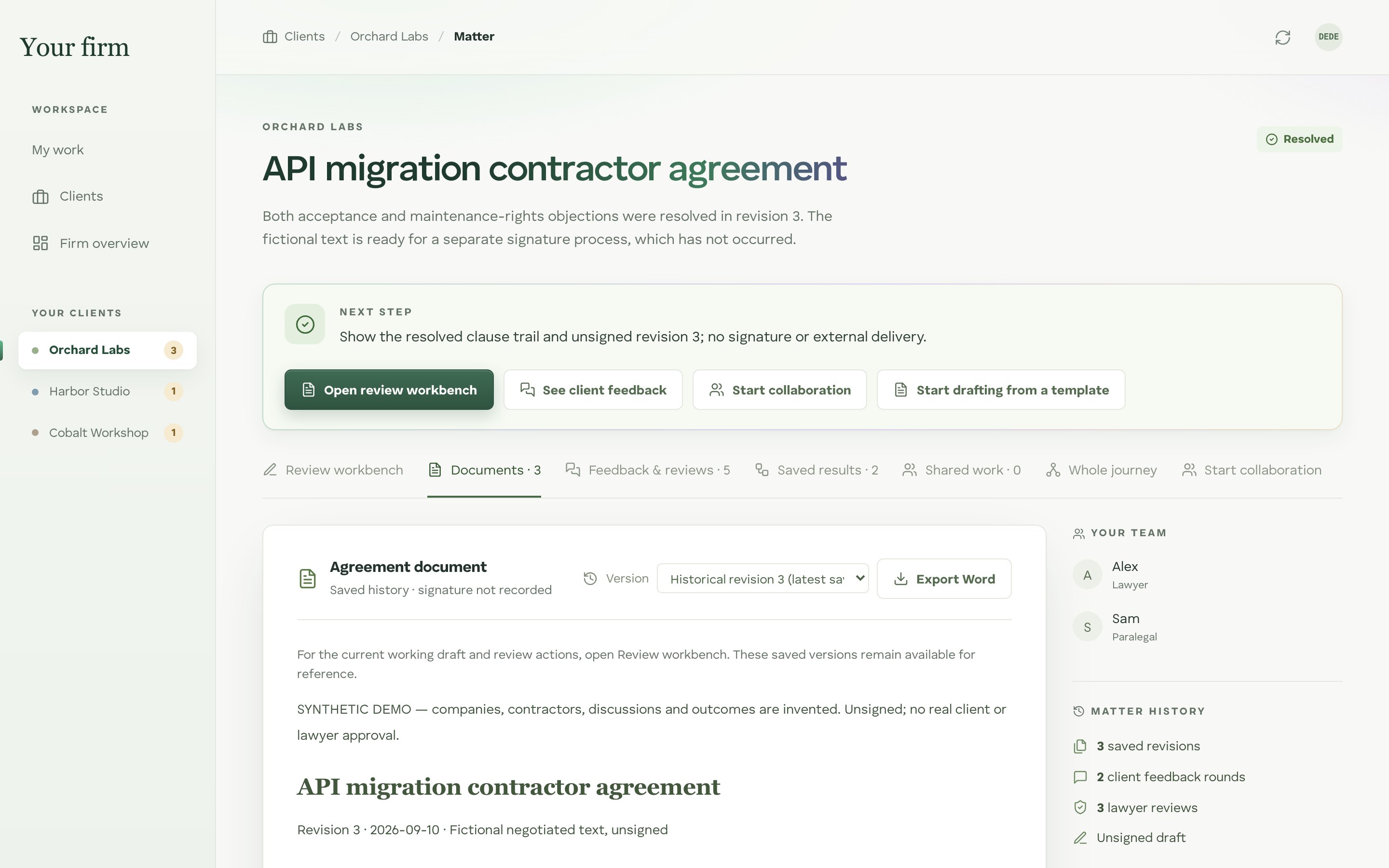
The matter
One page per matter: the next step, its documents, the feedback rounds and the full history.
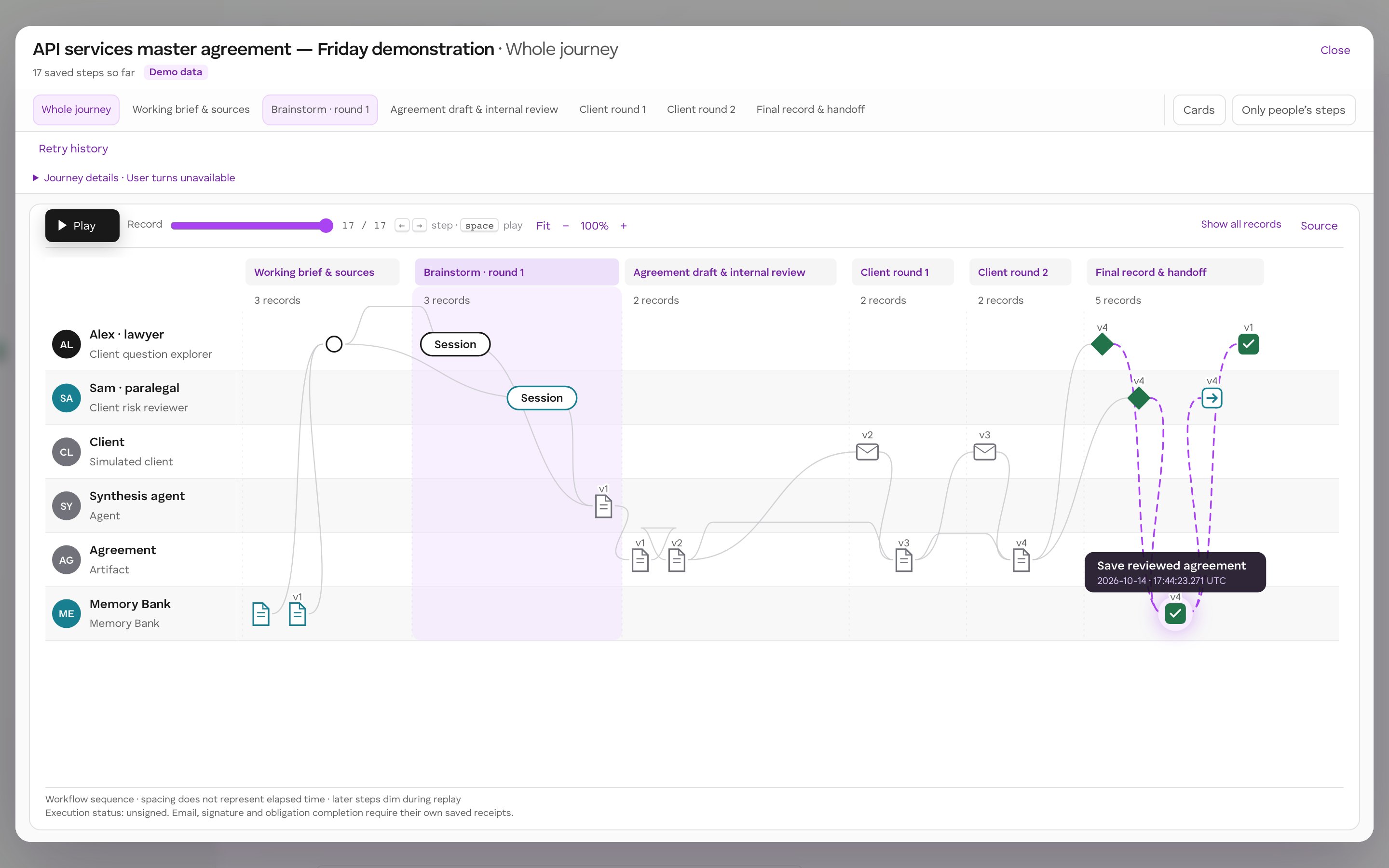
The whole journey
Every step of a matter in one place, as a memory bank timeline: who acted, which tool they used, what it produced, and what carried forward. Select a step to see who acted, what it used and what it carried forward.
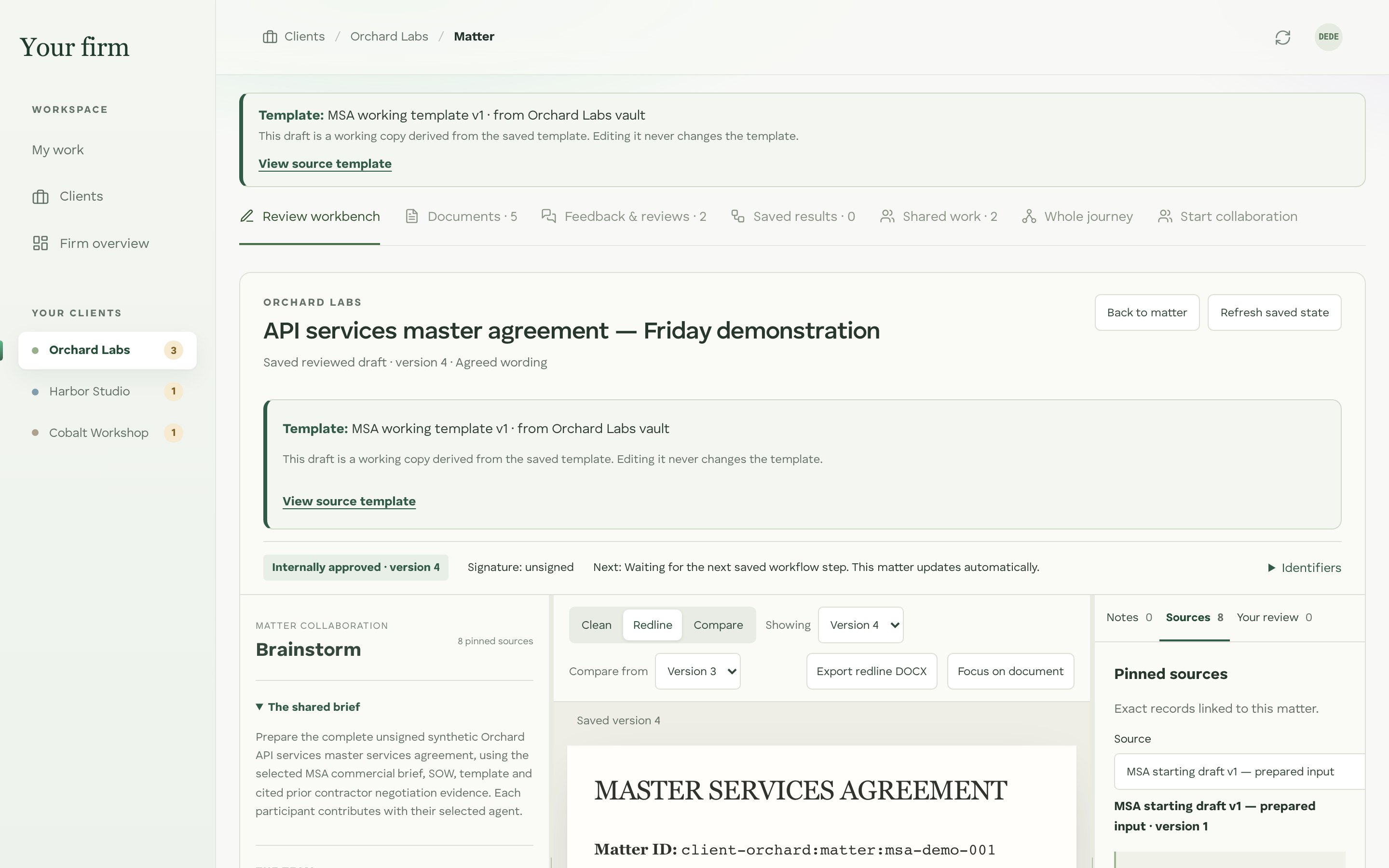
Agreement review
Clean, redline and compare views on exact saved versions, with the brief, the team and the pinned sources beside the text.
Confidentiality you can check.
Client data access, audit and lineage stay separate for every client, enforced by the platform the workspace runs on.
| Question | A hosted AI tool on its own | A local model in manykind | ChatGPT or Claude through manykind |
|---|---|---|---|
| Where the client file goes | To the vendor's servers, under the vendor's terms | Nowhere. The model comes to the vault | The file stays in the vault; the text of each prompt goes to the provider |
| Who keeps the context | The vendor | The client and the firm | The client and the firm |
| What is recorded | Metadata at most, held by the vendor | Every action: who, from what input, producing what | Every prompt and output, in the vault |
| What the firm's rules allow | Use off the record, or not at all | Use on real matters, under the firm's policy | Use where firm policy allows, on the record |
Use local models, or bring ChatGPT and Claude.
AI legal assistants help your lawyers think. They do not help the firm remember. Treat them as swappable reasoning: every agent, whichever model it uses, works under a grant the vault owner signs, and what it produces stays with the firm.
Start with one practice group.
For boutiques and mid-size firms that draft and negotiate for repeat clients: commercial contracts, corporate and employment work.
A pilot runs on a few of your clients and your own master templates. We import existing client history with its original dates, set up passkey sign-in for your team, and review the first matters with you.
What firms ask first.
Do we have to change how we work?
No. Your team keeps its templates, its Word files and the AI tools it already uses. manykind runs underneath, so the work lands in the client's vault with permissions and a record attached.
Does our clients' data train your models or other firms' templates?
No. Client data stays in that client's vault. Your firm's templates improve from patterns your partners approve, and nothing leaves your firm.
Which AI can our lawyers use?
Local models keep everything in the vault. ChatGPT or Claude can be used where firm policy allows; the prompt text goes to that provider, and every prompt and output is recorded in the vault.
Is this an e-signature tool?
No. Internal approval records that a lawyer reviewed one exact version; it is not a signature. The workspace shows execution status as unsigned until a signature is recorded, and signing happens in the process you already use.
Where is client data stored?
In the client vault, backed by storage controlled by the vault owner's key. Agents and apps work against it under signed agreements and do not hold their own copy of the client's data. If a lawyer uses a cloud model such as ChatGPT or Claude, the text in each prompt is processed by that provider, and the prompt and its output are recorded in the vault.
Do AI agents see everything?
No. An agent only reaches the scopes its agreement names, reads with the permissions of the person who started the run, and every run is recorded. The vault owner can revoke an agreement at any time.
Can we bring our existing files and emails?
Yes. Existing client history is imported with its original dates, and imported documents are checked against their hashes. Imported history is shown as history; it is never presented as new approvals or signatures.
Can our clients take part?
Clients can join their own matters to review drafts and respond in rounds. Each round is recorded against the exact version they saw.
Does it work with Word?
Yes. Any saved version can be exported as a clean or redline .docx file, with insertions and deletions as Word revisions.
What does it not do?
It does not sign or execute agreements and does not send email for you. Ownership means the client owns the data and can revoke access; it is not a claim that the hosting operator is technically unable to read it.
What does a pilot involve?
One practice group, a few clients and your master templates. We agree the scope on a first call, import the history you choose, and review the first matters together.